


The Feet Give Away an AI Dance Video
The face can be convincing and the outfit immaculate, yet the dance still looks wrong. Watch the shoe that is supposed to stay on the floor. If it glides sideways while the dancer turns, the weight of the whole movement disappears. An AI dance video has to survive that kind of ordinary scrutiny, especially when the audience already knows the routine.
This is where a prompt such as “dance energetically to the music” becomes frustrating. It describes a mood, leaving the actual steps undecided. A creator who wants a recognisable passage needs to supply more of the choreography, then judge the result against it.
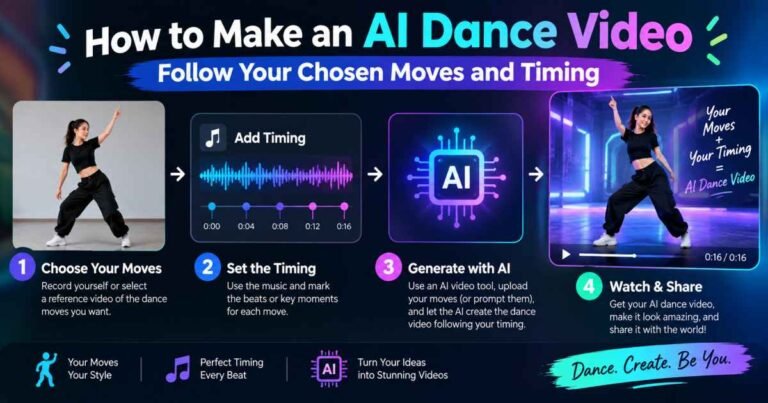
A motion reference supplies a video of the sequence you want the character to follow. The depth-dance template on ClipDance takes a movement reference separately from the character image. The distinction matters: one source shows what the body does, while the other supplies its appearance. Neither makes the finished performance exact by default.
Give the AI dance video a phrase worth recognising
Choose a short passage you could describe to somebody without showing the clip. A left step, a shoulder turn and a planted pause are enough for an initial attempt. Those movements give you identifiable moments to look for; a long routine full of cuts gives you more ways to lose track of what changed.
Use a recording you made or have permission to adapt. Ideally, the performer stays visible from head to shoes, the camera holds its position, and nobody walks between the lens and the dancer. A reference with an obscured landing asks the generator to fill a gap precisely where you need to judge contact with the floor.
Before uploading anything, play the passage with its music. Notice when the first movement begins. Does the dancer move on the accent, lead into it, or settle into a pose after it? Beat timing includes those decisions. Starting every action on a strong beat can change the character of a routine that originally played around the rhythm.
The still photograph needs the same attention. A full-body photo showing a standing person leaves less of the opening pose to be invented than a seated portrait. Give the arms room to move and leave some floor beneath the shoes. A long coat hiding the knees may be a good costume choice, but it makes a footwork test harder to read. For the first version, visibility is useful.
A prompt has to tell the references apart
Putting two files into an interface does not necessarily explain how they should be used. Check the selected mode and assign a job to each reference in the terms that tool accepts. Copying reference tokens from a tutorial for a different model can add confusion rather than control.
For the short phrase above, an original brief could read:
Follow the movement video’s left step, shoulder turn and final planted pause. Use the photograph for the adult performer, clothing and room. Keep the full body visible in a fixed frontal view, including the shoes throughout the turn.
That brief gives the dance choreography an order and a stopping point. It also avoids asking the camera to orbit at the same moment the body turns. If the result adds another spin at the end, revise the ending. If an arm leaves the frame, look at the composition before adding a paragraph about anatomy.
A still image by itself cannot communicate the timing of an entire routine. In a mode without motion-reference support, narrow the ambition to a movement the available controls can reasonably describe. You may be able to ask for a sway or a turn, but that is a different task from reproducing a particular sequence of steps.
Version records become useful as soon as you start changing performers. Keep the reference trim, source photo and instruction together. In a custom application using reAPI, those would be inputs your developer records alongside each video request, using a route that supports the required references. For a few experiments, the same record can simply be a folder and a note. What matters is being able to tell which combination produced the take you liked.
Watch once for the dance, then for the mistake
Play the result at normal speed before hunting through frames. Does the phrase still read as a left step followed by a turn and a pause? If you have to explain where the pause went, the performance has already departed from the brief.
Now compare the marked moments with the reference. During the turn, follow the planted shoe and the position of the hips. At the pause, see whether the body actually settles or keeps drifting. Check an arm as it passes across the torso, too; a plausible pose before the overlap does not excuse a hand emerging in the wrong place afterwards.
These observations help separate movement from synchronisation. The correct steps arriving consistently late may call for a timing adjustment. A foot sliding during what should be a stable hold is a different defect. Shifting the soundtrack will not repair the contact.
Music added after generation can help you judge an edit, provided you retain the reference timing. If you shift the sound to make one accent fit, replay the rest of the phrase. The opening may improve while the final landing moves farther away from the beat.
The final viewing should be an uninterrupted watch with the intended music. A frame-by-frame inspection can find defects, but an AI dance video also needs to hold together at the speed people will actually see it. Let the whole phrase finish before deciding whether it is ready to share.
